Monday, 6 February 2017

Textual Representation of logo

Dockerizing an existing Rails application

  Docker is a relatively new and rapidly growing project that allows creating very light “virtual machines”.

Prerequisites

There are no specific skills needed for this tutorial beyond a basic comfort with the command line and using a text editor. The following services are needed:
  • Docker Hub (Login - Signup if you haven't )
  • A Rails application

Setting up your computer

Getting all the tooling setup on your computer can be a daunting task, but thankfully as Docker has become stable, getting Docker up and running on your favorite OS has become very easy. First, we'll install Docker.
Until a few releases ago, running Docker on OSX and Windows was quite a hassle. Lately, however, Docker has invested significantly into improving the onboarding experience for its users on these OSes, thus running Docker now is a cakewalk. The getting started guide on Docker has detailed instructions for setting up Docker on Mac, Linux, and Windows.
Once you are done installing Docker, test your Docker installation by running the following:
$ docker run hello-world

Hello from Docker.

This message shows that your installation appears to be working correctly.
...
Starting with a Rails Application: I will not be going through docker commands as that would be found on dockers website and many blog sites. There are different ways you can deploy your Ruby applications in a Docker container. You can either choose one of the many existing Ruby images on the public docker registry

Building the base image

This image will set a base for the rest of the post as we will use the resulting image to create our set of Rails images.
The image will contain all the things Rails expects to compile and run properly on a Debian based OS. I am not going to talk about the required packages, instead, I am going to focus on the separation of concerns and configuration of the set of images.
One thing to keep in mind is that the image we’ll build is only for RubyOnRails and will not contain any database related packages. If there’s a need to install a gem with native extensions requiring “extra” packages those should go into that specific image unless all of your apps require it.
What should you expect from this image?
This image will not complain about any TTY warnings during installation because of the flag(noninteractive) we are using, all your applications will use as encoding(en_US.UTF-8) .thencoding.
Find the below Image and explanation as followed.
  • I am using ruby 1.9.3 for my Project.
  • Gemfile is already built with rails 3.2.3, You can use your own Gemfile.
#Dockerfile
FROM ubuntu:trusty  # Using Ubuntu OS
MAINTAINER "Santosh Mohanty <santa.jyp@gmail.com>" # Maintainer Name
RUN apt-get update # Updating OS

ENV PATH /usr/local/rvm/bin:$PATH  # Set ENV Path

RUN apt-get update && apt-get -y upgrade && apt-get -y install ruby 1.9.3 # Installation of Ruby
RUN ln -sf /usr/bin/ruby1.9.3 /etc/alternatives/ruby

# basics
RUN apt-get install -y build-essential
RUN apt-get install -y mysql-client libmysqlclient-dev openssl libreadline6 
                       libreadline6-dev curl zlib1g zlib1g-dev libssl-dev libyaml-dev
                       libsqlite3-dev sqlite3 libxml2-dev libxslt-dev autoconf libc6-dev
                       ncurses-dev automake libtool bison subversion pkg-  config gawk 
                       libgdbm-dev libffi-dev npm

RUN gem install bundler
ADD Gemfile /app/Gemfile
ADD Gemfile.lock /app/Gemfile.lock
WORKDIR /app
RUN bundle install
ADD . /app      # Adds your Project Structure to docker
ENV ENVIRONMENT development
CMD ["rails","s"]

EXPOSE 3000 # Exposing PORT 3000 for Development

Executing the Image:

Follow the Below steps to Build your Docker Image from Dockerfile:
docker build -t rails_image ~/workspace/PATH_TO_DOCKERFILE
docker run -p 3000:3000 rails_image # Mapping container port 3000 to local port 3000
This would run your rails application inside docker container
Few Imp commands:
docker run -it rails_image /bin/bash # this would bring up the bash prompt of docker
docker images # List Images
docker rmi IMAGE_ID -f  # remove Image
docker ps  # for listing running containers.
You may find difficulties in connecting to DB from Container, This can be solved running a DB Image or pointing to Specific IP of DB instead of local IP.

I will be writing a blog on how to connect MySQL DB Image to Rails Image using docker compose.

Wednesday, 2 September 2015

Textual description of firstImageUrl

Why You Should Move to Rails 5

Every one of us is waiting for a new and clean release of Rails 5 , which not only accepts the SPA(Single Page Application) Implementation easily but also has enhanced the performance and structure of thr most popular Rails frame work.

The release of Rails 5 is supposed to be fall on summer/fall of 2015.

Lets discuss the rich changes/implementation of Rails 5.

MERGING RAILS API

SPA is on rise, while developing a Single page application we rails developers faced a lot of issues, the routing was lacked and there were several security vulnerabilities that we had to handle.

In Rails 5, the rails-api Gem will be merged into core allowing the use of Rails as Simple JSON API. Which ease building API using Javascript Library.

NO MORE RAKE COMMANDS

In Rails 5 all the current rake commands will be accessible via the rails command.
When you want to run a migration, you will type rake db:migrate in Rails 4. In Rails 5 this will become railsdb:migrate.
The reason for this change is that currently it's not very logical which command has to go through rake and which command should go through rails. When you're working with rails for a longer time it becomes second nature, but only because you remember it.
For a newcomer, this is a big problem and makes learning rails confusing.
See this issue on GitHub for more details .

WHEN TO USE RAKE

You can now restart all of your apps with the command rake restart.
See this Pull Request for more details .

TEST CASES CHANGES

In Rails 5, the test helpers assigns() and assert_template() will be deprecated. Its because testing instance variable and what template is being called smells bad. These are internals of controller and controller tests should not care about what vars I set.
Controllers test are concerned about HTTP,Cookies, Renders, Redirects and so on.
More Details can be found here .

BLOOMING RUBY 2.2.1

Rails will only support Ruby 2.2.1 and up. Since it wants to be able to leverage all the speed improvements in the newer ruby versions. They skipped version 2.2.0 since it has a segfault bug source.

TURBOLINKS 3

For the folks who don’t like to meddle around with JS, Turbolinks offers an instantaneous performance boost, and allows you to retain most of your page and selectively update certain regions through partials. This is very similar to how SPA’s work, and you can choose to do all this from the server.

ACTION CABLE

Many projects these days use WebSockets to push live updates to the client. While most client browsers(IE > 9, Chrome, Firefox, Safari) have started to support this, we still need a robust client on the server to manage the subscribers and send an update signal appropriately. This feature is available out of the box in some of the newer frameworks, like Phoenix for Erlang. However, the Rails community had to resort to third party implementations, like Pushr, to get this working.

Rails traditionally offers all the tools that one needs to build a great app out of the box. That’s one reason why it is so popular, especially among the startup community. The lack of WebSocket support was a reason for major discontent among the community. It looks like the Rails core team took note of this and came up with Action Cable.

As a Team of Ruby , Rails, Java,JS and CSS Developer we are Commited towards the trending technologies and simplifying developers and Clients Projects .

For any Information regarding Upgrading your Rails Application or building your ideas we welcome you to Our Community.

This post is created by Santosh Mohanty . You can contact him for any questions at santa.jyp@gmail.com or message him on his linkedIn profile .


Thursday, 30 October 2014

Textual description of firstImageUrl

How To Configure SSL with NGINX IN RAILS

In our previous post,we have learnt how to use ssl in a rails application by modifiying application server and application configurations.

In this post we will be configuring/bypassing Proxy for using ssl in an web server.

We will be using Nginx for our configuration.

To configure an HTTPS server, the ssl parameter must be enabled on listening sockets in the server block, and the locations of the server certificate and private key files should be specified.

Generate your ssl keys using the previous post and copy over the files to nginx directory.


Download the nginx.conf file , take back up of your existing configuration and replace it .

Steps to follow:
1. Add the number of worker process you need by default it should be 1. e.g worker_processes 4;
2. Make sure that path of ssl_certificate & ssl_certificate_key are correct.
3. Create dir/entry for access_log & error_log.
4. In the upstream section you can configure your server address with port for https, like this
 
   upstream proxy_pass_server {
            server 127.0.0.1:3000 fail_timeout=0;
      }
Here I am pointing to localhost port 3000 and added server_name 127.0.0.1 in Server Section of configuration

Now , Start your rails server independent of application server in 3000 port and type https://localhost

Your application Now runs on HTTPS .

Thanks to Santosh for writing this post .

REFER NGINX For more Details

Monday, 13 October 2014

Textual description of firstImageUrl

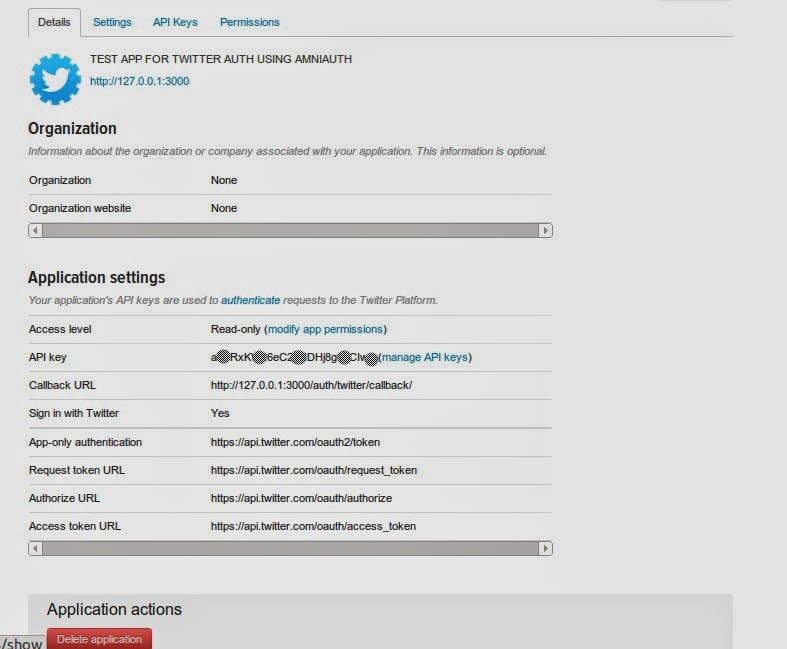
Social Media Authentication On Rails- Part 1

This Post is intended to provide an overview of the installation of social authentication plugins like Twitter/Github/Facebook & Google using Rails version 4 with devise(authentication plugin),omniauth(API Plugin for Social websites) & Mongo DB as underlying Database.


Before Proceeding towards installation/building a rails application that allows authentication with social websites we need to get API/Client Keys & API/Client Secret.


Here are the urls from where you can create an App and get the keys:


Facebook:

URL: Facebook Link


Twitter:>

URL: Twitter


Settings: Enter call back url as : http://127.0.0.1:3000/auth/twitter/callback/ under settings tab once you create an application


Google:

URL: Google URL


Settings: Go to API Access and enter redirect url as http://localhost:3000/users/auth/google_oauth2/callback


LinkedIn:>

URL: LinkedIn URL

Linked In Api Doesnot require any call back URI. Application URL is Enough for Linked in api as Omniauth-linked Has its method defined in Gem.


In the next post , the ROR code will be explained to integrate these social applications .


Tuesday, 19 August 2014

Textual description of firstImageUrl

How To Link Git Tag with Rails app

I use Git tags to manage the version numbers of my Rails apps.

Every time a new version is ready, I tag the current commit like this :
git tag -a v1.10 -m "FIXED PC-43/67/78"
I have created a ruby file in initializers which defines a constant to hold this information (in this case “v1.10”):
APP_VERSION = `git describe --always` unless defined? APP_VERSION
This constant simply contains the output of Git describe.
Now I can use it anywhere in my app where I would like to display the version number.

This post is written by Santosh.

Post Comments And Suggestions

Wednesday, 11 June 2014

Textual description of firstImageUrl

How Ruby Source Code Gets Executed

Programming languages, such as Ruby, are natural and elegant. But to achieve this elegance, things have to happen under the hood.

Let's see how does a ruby code is compiled and interpreted.

Before moving forward lets see the structure(cross-section) of ruby and its world.


90% of work is done on the surface, so that we focus on developing business value .

The following code will be split into tokens by ruby lexer
 puts 'Welcome to Ruby World'
Tokenized Representation :
 [“puts”,” ”,”'”,”Welcome to Ruby World”,”'”]
Lexed Representation :
Lexer Format:
 [[line number,column],type,token]
 [[1,0]:on_ident,”puts”],
  [1,4]:on_sp,” ”]
  [1,5]:on_t_string_beg,”'”]
  [1,6]:on_t_string_content,”Welcome to Ruby World”]
  [1,28]:on_t_string_end,”'”]]
Once the code generates token & is lexed , now the parser will start its job by taking the lexed representation and create a Abstract syntax tree.


AST:
 [:program,
   [[:command,
    [:@ident, ”puts” , [1,0] ],
     [:args_add_block,
      [[:string_literal,
       [:string_content],[:@string_content, “Welcome to Ruby World”,[1,6]]]]],
 false]]]
Once AST finishes the job the compiler will convert to byte code, Now it is executed/interpreted by VM

This is Implemented in MRI. Ruby uses lex(Lexer) & bison(parser generator).
Implementation of Above code in CLI/Ruby Program :
 require “ripper”
 require “pp”
 src= “puts 'Welcome to Ruby World'”
 puts “source: #{src}”
 puts “tokenized:”
 pp Ripper.tokenize(src)
 puts “lexed:”
 pp Ripper.lex(src)
 puts “parsed:”
 pp Ripper.sexp(src)
Refer Confreaks
Njoy Coding in Ruby !!

Thanks to Santosh Mohanty for writing this post .

Monday, 3 March 2014

Textual Representation of logo

How to Use SSL in RAILS

Here Are the steps to be used in order to enable HTTPS in your rails web app .

Create SSL Certificate to Use HTTPS In Rails ENV (Rails Version > 3.0.0)

 # Self Signed SSL Certificate to Use with rails

  •  Go To Your Project Root Folder 
  •  Type “mkdir .ssl”
  •  Type “openssl req -new -newkey rsa:2048 -sha1 -days 365 -nodes -x509 -keyout .ssl/localhost.key -out .ssl/localhost.crt”   
Command Explanation:
# req      --> Create a new Request.
# -x509    --> The result of this will be an X.509 certificate, not a Certificate Signing request.

# -sha1    --> Make sure to use SHA1 as this certificate's hashing algorithm. (newer versions of OpenSSL should default to this)

# -newkey  --> create a new key.

# rsa:2048 --> the key will be of type RSA, and will be 2048 bits long

# -nodes   --> Don't encrypt the key


Here is the Sample Input for the following parameters:
Generating a 2048 bit RSA private key

....+++

..................................+++

unable to write 'random state'

writing new private key to '.ssl/localhost.key'

-----

You are about to be asked to enter information that will be incorporated

into your certificate request.

What you are about to enter is what is called a Distinguished Name or a DN.

There are quite a few fields but you can leave some blank

For some fields there will be a default value,

If you enter '.', the field will be left blank.

-----

Country Name (2 letter code) [AU]:IN

State or Province Name (full name) [Some-State]:RAJASTHAN

Locality Name (eg, city) []:Bhilwara

Organization Name (eg, company) [Internet Widgits Pty Ltd]:JavaRoots

Organizational Unit Name (eg, section) []:Rails

Common Name (e.g. server FQDN or YOUR name) []:RAILS DEV TEAM

Email Address []:railsdevteam@devteam.com


This will create following files in your SSL folder :
1. localhost.crt

2. localhost.key

Now After creating ssl files , following steps will be required :

  • Run “echo "127.0.0.1 localhost.ssl" | sudo tee -a /private/etc/hosts”
  • Edit you GemFile and add gem “thin”
  • Create a New Initializer file named ssl_config.rb add these lines:
    ActionController::ForceSSL::ClassMethods.module_eval do
      def force_ssl(options = {})
        config = Rails.application.config
    
        return unless config.use_ssl # <= this is new
    
        host = options.delete(:host)
        port = config.ssl_port if config.respond_to?(:ssl_port) && config.ssl_port.present? # <= this is also new
    
        before_filter(options) do
          if !request.ssl?# && !Rails.env.development? # commented out the exclusion of the development environment
            redirect_options = {:protocol => 'https://', :status => :moved_permanently}
            redirect_options.merge!(:host => host) if host
            redirect_options.merge!(:port => port) if port # <= this is also new
            redirect_options.merge!(:params => request.query_parameters)
            redirect_to redirect_options
          end
        end
      end
    end


  • Open your config/application.rb and add “config.use_ssl = false”
  • Now edit your enviroment files to
     development.rb => 
      “config.use_ssl = true”
      “config.ssl_port = 3000”
    
  • Now Add “force_ssl” to app/controllers/application_controller.rb at top priority.
  • Now Run your Server using this command:
     “thin start -p 3000 --ssl --ssl-verify --ssl-key-file .ssl/localhost.key --ssl-cert-file .ssl/localhost.crt”
    
    
Voila !! Now your rails server is configured to use HTTPS !!!


Njoy Coding in Rails.


A Big Thanks to Santosh for writing this post !!